
Configuration
MultiFlexi offers flexible configuration options ranging from server-level environment variables to granular per-application settings.
System Configuration
The core system behavior is controlled via environment variables, typically loaded from /etc/multiflexi/multiflexi.env.
Database Settings
DB_CONNECTION: Database driver (e.g.,
mysql,pgsql).DB_HOST: Database host address.
DB_PORT: Database port (default:
3306).DB_DATABASE: Database name.
DB_USERNAME: Database user name.
DB_PASSWORD: Database password.
Security Options
ENCRYPTION_MASTER_KEY: Master key used for data encryption (Critical: Back this up).
CSRF_PROTECTION_ENABLED: Enable Cross-Site Request Forgery protection (default:
true).BRUTE_FORCE_PROTECTION_ENABLED: Enable protection against brute force attacks (default:
true).BRUTE_FORCE_MAX_ATTEMPTS: Maximum number of failed attempts allowed (default:
5).BRUTE_FORCE_LOCKOUT_DURATION: Duration in seconds to lock out an IP after max attempts (default:
900).BRUTE_FORCE_TIME_WINDOW: Time window in seconds to count attempts (default:
300).BRUTE_FORCE_IP_LIMITING: Enable IP-based limiting for brute force protection (default:
true).SECURITY_LOGGING_ENABLED: Enable security audit logging (default:
true).DATA_ENCRYPTION_ENABLED: Enable data encryption features (default:
true).RATE_LIMITING_ENABLED: Enable general rate limiting (default:
true).IP_WHITELIST_ENABLED: Enable IP whitelisting (default:
false).TWO_FACTOR_AUTH_ENABLED: Enable Two-Factor Authentication (default:
true).RBAC_ENABLED: Enable Role-Based Access Control (default:
true).
Session Management
SESSION_TIMEOUT: Session timeout in seconds (default:
3600).SESSION_REGENERATION_INTERVAL: Interval in seconds to regenerate session ID (default:
300).SESSION_STRICT_USER_AGENT: Enforce strict User-Agent checking for sessions (default:
true).SESSION_STRICT_IP_ADDRESS: Enforce strict IP address checking for sessions (default:
false).
API Limits
API_DEBUG: Enable API debug mode (default:
false).API_RATE_LIMITING_ENABLED: Enable API-specific rate limiting (default:
true).API_RATE_LIMIT_REQUESTS: Max API requests per window (default:
100).API_RATE_LIMIT_WINDOW: API rate limit window in seconds (default:
3600).
Email & Notifications
EMAIL_FROM: Default sender address for emails (default:
multiflexi@<SERVER_NAME>).SEND_INFO_TO: Email address to send informational notifications to (default:
false).
Logging & Telemetry
LOG_DIRECTORY: Directory for log files (default:
/var/log/multiflexi).ZABBIX_SERVER: Zabbix server address for logging to Zabbix.
ENABLE_GOOGLE_ANALYTICS: Enable Google Analytics (default:
false).LIVE_OUTPUT_SOCKET: WebSocket URI for live output (e.g.,
ws://localhost:8080).
Integrations
NODERED_ENABLED: Show the Node-RED link in the web interface (default:
false).NODERED_URL: Base URL of the Node-RED editor (e.g.,
http://localhost:1880). The navbar link appears only when bothNODERED_ENABLEDis true andNODERED_URLis set.NODERED_WEBHOOK_URL:
multiflexi-eventorNode-RED bridge endpoint. When set, the event processor forwards webhook changes and finished jobs to this Node-RED HTTP-in URL. Leave empty to disable the bridge. Configurable at install time viadpkg-reconfigure multiflexi-eventor.NODERED_TOKEN: Optional shared secret sent as the
X-MultiFlexi-Tokenheader with each Node-RED bridge request.NODERED_FORWARD_CHANGES: Forward incoming webhook changes in addition to finished jobs over the Node-RED bridge (default:
true).NODERED_CATALOG_URL:
multiflexi-eventorcatalog feed endpoint. When set, the event processor publishes all companies, enabled run-templates and credentials to thenode-red-contrib-multiflexicatalog node, which builds one palette node per entity. Use a path distinct fromNODERED_WEBHOOK_URL. Leave empty to disable.NODERED_CATALOG_INTERVAL: How often (seconds) the catalog is republished; an unchanged catalog (content-hashed) is not resent (default:
300).ZABBIX_URL: Base URL of the Zabbix web frontend (e.g.,
https://zabbix.example.com/zabbix). When set, a Zabbix entry is added to the Integrations menu. This is separate fromZABBIX_SERVER(see Logging & Telemetry), which is the trapper/proxy host used for sending metrics and is not necessarily reachable as a web frontend.OTEL_DASHBOARD_URL: Base URL of the observability dashboard (e.g.,
https://grafana.example.com). When set andOTEL_ENABLEDis true, an OpenTelemetry entry is added to the Integrations menu. This is separate fromOTEL_EXPORTER_OTLP_ENDPOINT(see Logging & Telemetry), which is the OTLP ingest endpoint and is not a browsable UI.
Application Configuration
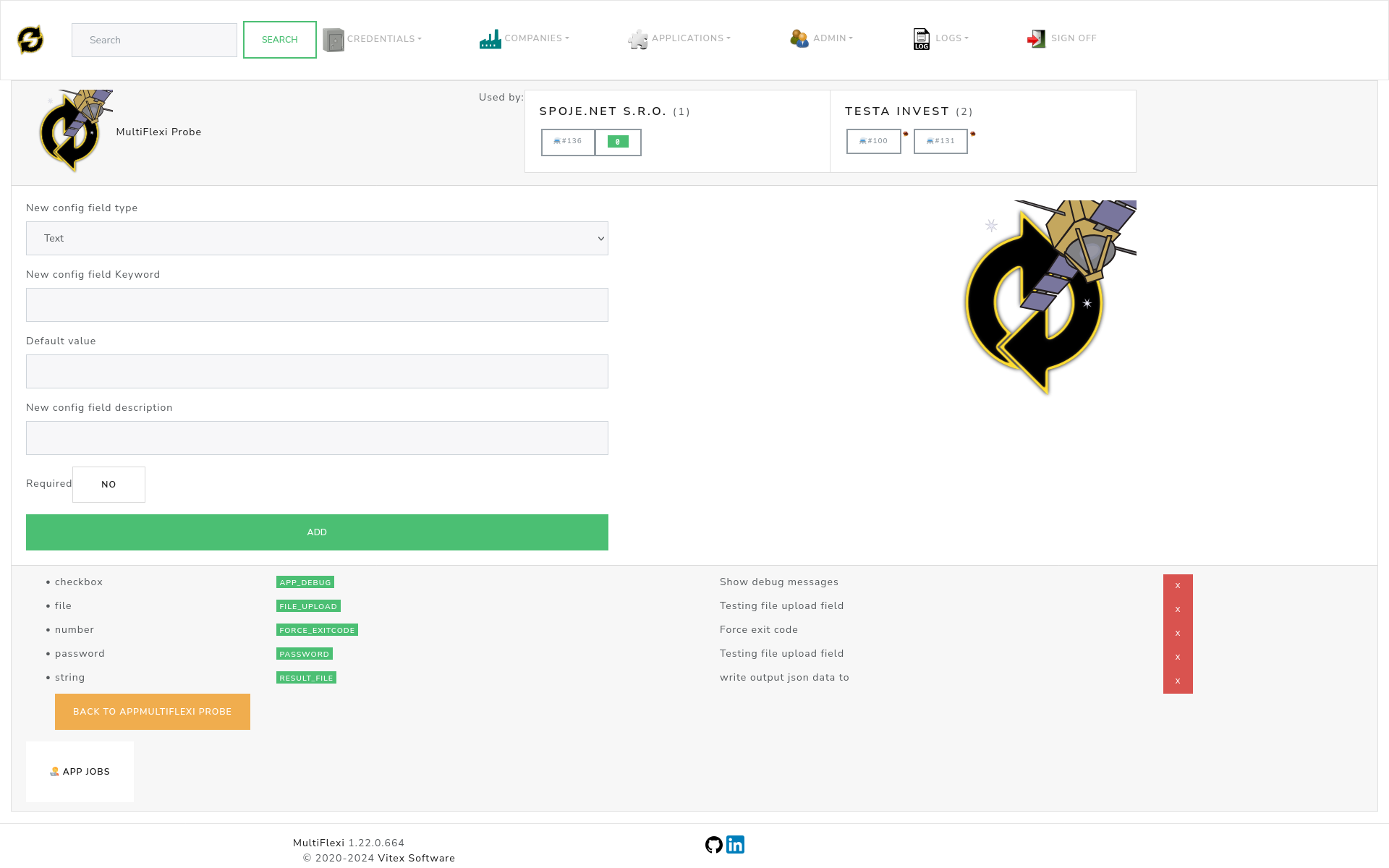
Each application installed in MultiFlexi defines its own specific configuration fields. These are managed through the web interface.
Configuration Field Types
MultiFlexi utilizes a typed configuration system to ensure valid data input:
Text: Standard single-line input.
Number: Numeric input (integer or decimal).
Date: Date picker widget.
Email: Validated email input.
Password: Masked input for sensitive credentials.
Checkbox: Boolean switch (Yes/No).
File: File upload widget.
Directory: Server-side directory path selector.
GDPR & Compliance
MultiFlexi includes built-in tools to assist with GDPR compliance.
Security Audit: Logs all access and modification events.
Data Encryption: Encrypts sensitive fields at rest using AES-256.
Retention Policies: Configurable automated data cleanup schedules.
Anonymization: Tools to anonymize personal data after retention periods expire.
Refer to GDPR Compliance for a detailed implementation guide.
OpenTelemetry
For enterprise observability, MultiFlexi supports OpenTelemetry.
Service Name: Identifier for the MultiFlexi instance.
Collector Endpoint: URL of your OTLP collector.
Protocol: gRPC or HTTP.
See OpenTelemetry Integration for configuration details.
Logging
Logs are essential for monitoring and troubleshooting.
Locations:
File:
/var/log/multiflexi/multiflexi.log(Rotated daily).System: Syslog / Journald integration.
Database: Viewable via Web UI (latest events).
Zabbix: Real-time error trapping (if configured).
Tip
To watch logs in real-time via CLI:
tail -f /var/log/multiflexi/multiflexi.log